Tool profile
OpenMeetings
Openmeetings provides video conferencing, instant messaging, white board, collaborative document...
What is OpenMeetings?
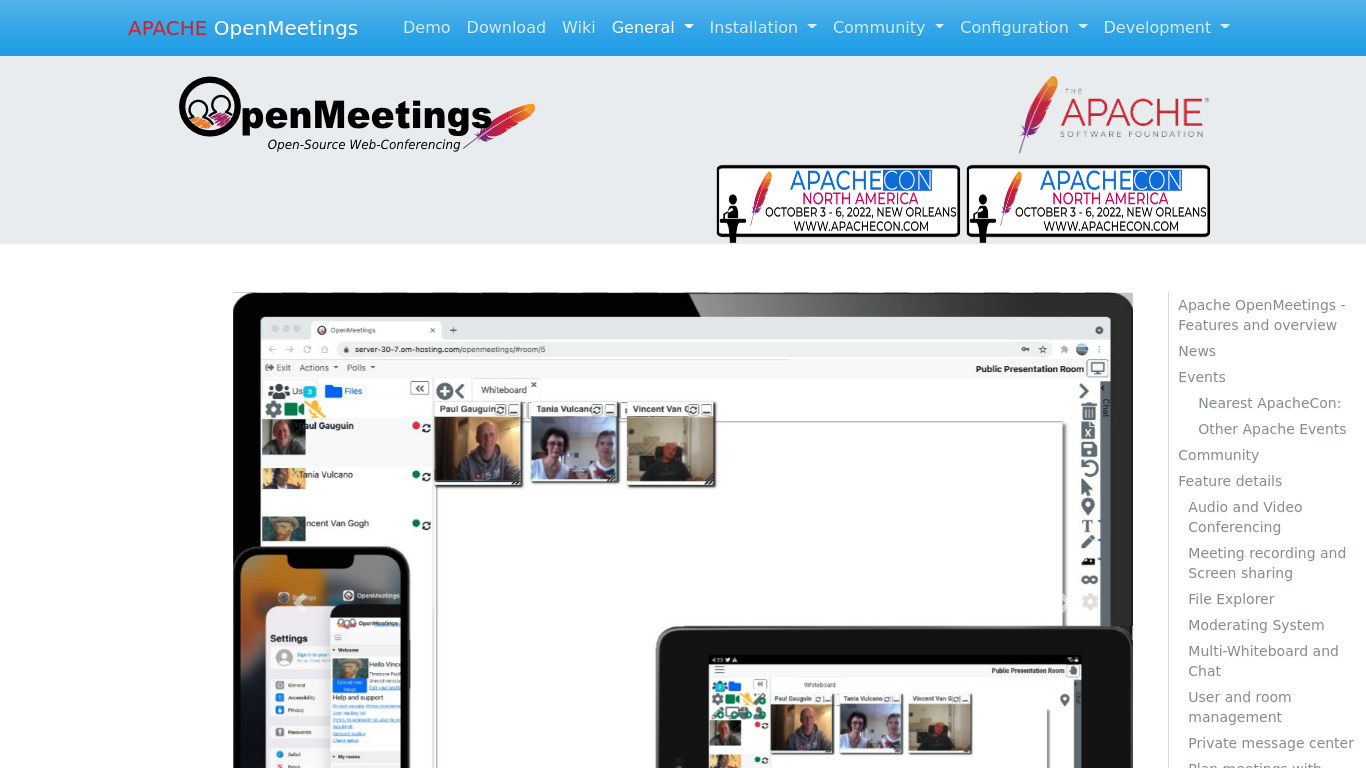
OpenMeetings is an open-source communication platform well-suited for users who need video conferencing, a collaborative whiteboard, screen sharing, recording, and chat. Because it is open source, users have access to the source code to modify it to meet specific requirements, and administrators can utilize user and permission management controls.
The platform also supports integration with Learning Management Systems (LMS) and Content Management Systems (CMS) and provides multi-device support for desktops, tablets, and smartphones. However, exact pricing details are not listed in the facts, so check their pricing page for current plans.
Features
Open Source
OpenMeetings is an open-source platform, meaning that it's free to use and can be customized to meet specific user needs. Users have access to the source code and can modify it according to their requirements.
Rich Feature Set
Includes a variety of features such as video conferencing, collaborative whiteboard, screen sharing, recording, and chat, making it suitable for different types of meetings and webinars.
Integration
Can easily integrate with other systems like Learning Management Systems (LMS) and Content Management Systems (CMS), enhancing its functionality and enabling seamless workflow.
Multi-device Support
Can be accessed from multiple devices including desktops, tablets, and smartphones, providing flexibility for users to join meetings from various platforms.
User Management
Includes features for user and permission management, allowing administrators to control who has access to meetings and various functionalities.
Screenshots
OpenMeetings vs. its alternatives
| OpenMeetings |  WebEx WebEx |  ClickMeeting ClickMeeting |  GoToWebinar GoToWebinar |  UberConference UberConference | |
|---|---|---|---|---|---|
| Pricing | — | — | — | — | — |
| Platforms | — | — | — | ||
| Listed features | 5 | 5 | 8 | 6 | 5 |
Frequently asked questions
How much does OpenMeetings cost?
Exact pricing details are not listed in the facts, so check their pricing page for current plans.
What is OpenMeetings used for?
OpenMeetings is used for communication, providing video conferencing, instant messaging, a collaborative whiteboard, collaborative documents, screen sharing, recording, and chat for meetings and webinars.
What devices can I use to access OpenMeetings?
OpenMeetings offers multi-device support and can be accessed from desktops, tablets, and smartphones via the Web platform.
Can I modify the source code of OpenMeetings?
Yes, OpenMeetings is an open-source platform, giving users access to the source code so they can modify it and customize it to meet specific user needs.
Does OpenMeetings integrate with other systems?
Yes, OpenMeetings can easily integrate with other systems like Learning Management Systems (LMS) and Content Management Systems (CMS) to enhance functionality and enable a seamless workflow.
How does user and permission management work in OpenMeetings?
OpenMeetings includes user management features that allow administrators to control who has access to meetings and various functionalities.
What are the best alternatives to OpenMeetings?
Alternatives to OpenMeetings include WebEx, ClickMeeting, and GoToWebinar. You might prefer these alternatives depending on your specific needs for webinars, conferencing, and proprietary software features.
Alternatives to OpenMeetings
Read the full comparison →WebEx
Cisco WebEx Web Conferencing, Online Meetings, Desktop Sharing, Video Conferencing


Zoom
Equip your team with tools designed to collaborate, connect, and engage with teammates and customers, no matter where you’re located, all in one platform.

BigBlueButton
Engage Your Online Students. BigBlueButton is a web conferencing system designed for online learning.

Zoho Cliq
Team chat that's built for work