Tool profile
mRemoteNG
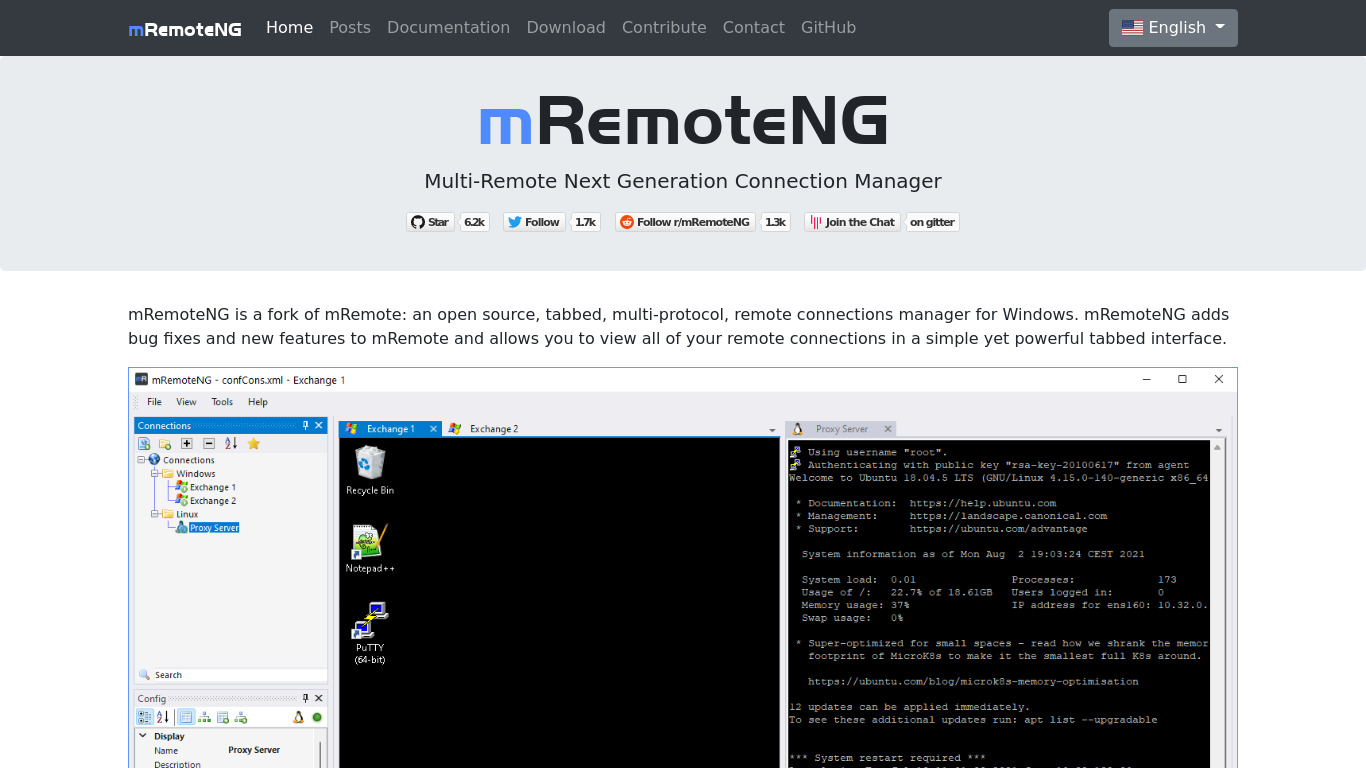
mRemoteNG is a fork of mRemote, an open source, tabbed, multi-protocol, remote connections manager.
What is mRemoteNG?
mRemoteNG is a free, open-source, tabbed, multi-protocol remote connections manager well-suited for individuals and businesses looking to manage different types of remote connections in a single window. Key features include centralized session storage, credential management for secure logins, and support for RDP, VNC, SSH, Telnet, and other protocols.
While the open-source model makes it a cost-effective solution, users should note that the platform availability listed in the facts is Web. If you require specific integrations or capabilities not explicitly covered in the verified facts, check their official resources for current details.
Features
Multiple Protocols Supported
mRemoteNG supports various protocols including RDP, VNC, SSH, Telnet, and more, making it a versatile tool for managing different types of remote connections.
Tabbed Interface
The tabbed interface allows users to manage multiple remote sessions easily and switch between them quickly within a single window.
Open Source
As an open-source project, mRemoteNG is free to use and can be modified to fit specific needs, making it a cost-effective solution for individuals and businesses.
Centralized Management
Users can store all their sessions in one central location, streamlining the process of managing and accessing remote connections.
Credential Management
mRemoteNG includes built-in support for storing and managing credentials securely, helping users maintain security while simplifying login processes.
Screenshots
mRemoteNG vs. its alternatives
| mRemoteNG |  TeamViewer TeamViewer |  AnyDesk AnyDesk |  TightVNC TightVNC |  Remote Desktop Manager Remote Desktop Manager | |
|---|---|---|---|---|---|
| Pricing | Open source | — | — | — | — |
| Platforms | — | ||||
| Listed features | 5 | 7 | 6 | 6 | 7 |
Frequently asked questions
Is mRemoteNG free?
Yes, mRemoteNG is an open-source project that is free to use and can be modified to fit specific needs.
What is mRemoteNG used for?
mRemoteNG is used as a remote connections manager to store all your sessions in one central location and manage multiple remote sessions easily within a single window.
What platforms does mRemoteNG support?
mRemoteNG supports the Web platform according to the verified facts.
What protocols does the Multiple Protocols Supported feature include?
The multiple protocols supported include RDP, VNC, SSH, Telnet, and more.
How does Credential Management work in mRemoteNG?
mRemoteNG includes built-in support for storing and managing credentials securely to help maintain security while simplifying login processes.
What are the best alternatives to mRemoteNG?
Known alternatives include TeamViewer, AnyDesk, and TightVNC. You might prefer these alternatives depending on your specific protocol, platform, or management requirements.
Alternatives to mRemoteNG
Read the full comparison →TeamViewer
TeamViewer lets you establish a connection to any PC or server within just a few seconds.
AnyDesk
AnyDesk is the world's most comfortable remote desktop application. Access all your programs, documents and files from anywhere, without having to entrust your data to a cloud service.
TightVNC
TightVNC - VNC-Compatible Remote Control / Remote Desktop Software. Download TightVNCDownload TightVNC 1. 3. 10 - TightVNC Server - F. A. Read more about TightVNC.
Remote Desktop Manager
Remote Desktop Manager is a remote connection and password management platform for IT pros trusted by more than 300 000 users in 130 countries.Add-ons - Remote Desktop .
Apple Remote Desktop
Apple Remote Desktop is the best way to manage the Mac computers on your network.
Jump Desktop
Connect to any computer in the world. Jump Desktop is a secure and reliable remote desktop (RDP & VNC) app for iOS, Mac, Android and PCs which lets you connect to any computer, anywhere in the world.