Tool profile
Adalo
Build apps for every platform, without code ✨
What is Adalo?
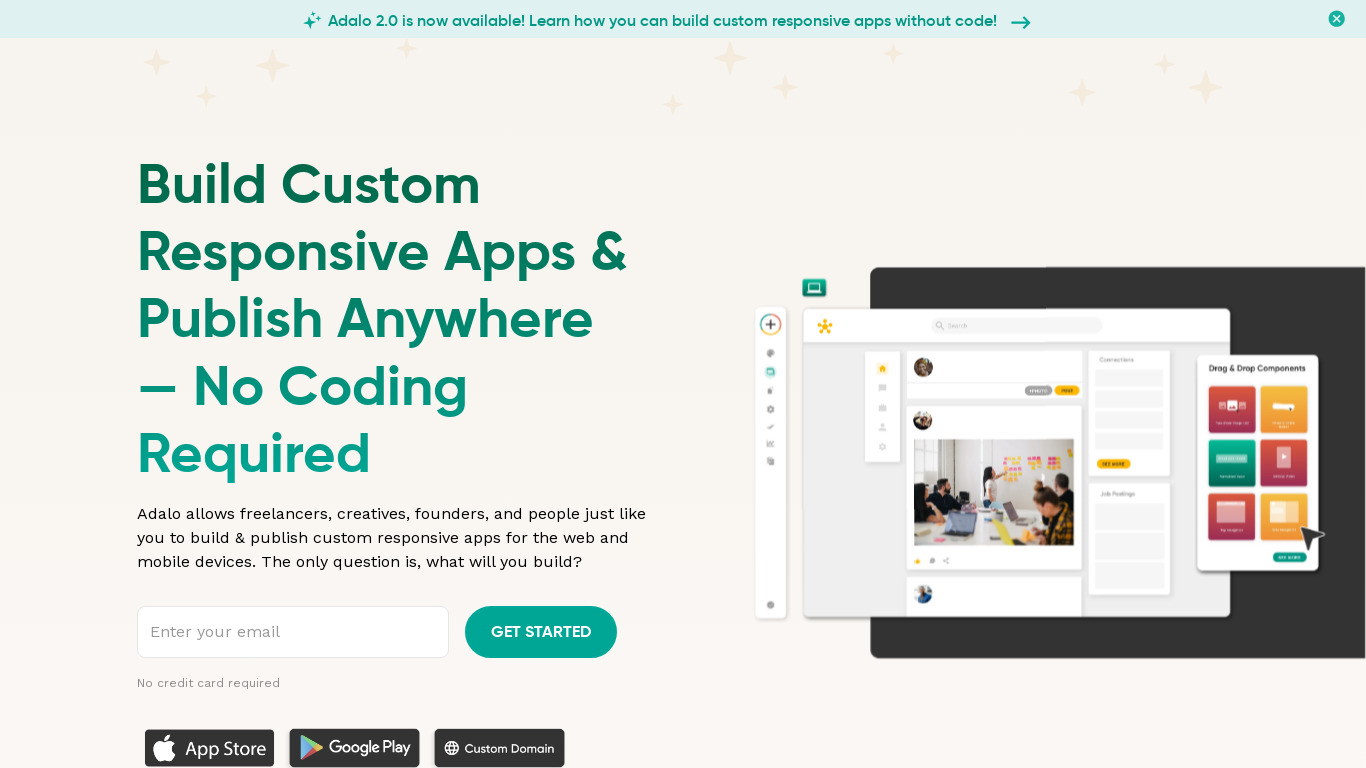
Adalo is a no-code IDE designed for users without technical skills who want to build applications for iOS, Android, and the web. It stands out with a user-friendly drag-and-drop interface, customizable components, and integration with various third-party services and APIs. This makes it a strong option for rapid prototyping and quick design and deployment.
However, specific pricing plans are not detailed in the available facts, so check their pricing page for current plans. While the platform enables rapid development and lowers costs compared to traditional coding methods, users should review its specific platform and integration capabilities against their project requirements before committing.
Features
User-Friendly Interface
Adalo offers a highly intuitive drag-and-drop interface, making it accessible for users without technical skills.
Rapid Prototyping
The platform allows for quick design and deployment, enabling users to rapidly prototype and test their applications.
Integration with Various Services
Adalo supports integration with a variety of third-party services and APIs, enhancing its functionality and versatility.
Customizable Components
Users can customize pre-built components or create their own, offering flexibility in app design.
Cross-Platform Capability
Adalo enables the development of apps for both iOS and Android platforms, as well as web applications.
Accessibility
No-code platforms enable individuals without technical backgrounds to build software, expanding the pool of potential developers and democratizing application creation.
Speed
No-code tools allow for rapid development and iteration, enabling users to build and modify applications much faster than traditional coding methods.
Cost-Effective
By reducing the need for professional developers, no-code platforms can help lower development costs, making digital innovation more accessible to smaller businesses.
Innovation
With more people able to create solutions, no-code fosters innovation by allowing diverse ideas and applications to be tested and implemented quickly.
Screenshots
Adalo vs. its alternatives
| Adalo |  Webflow Webflow |  Airtable Airtable |  Android Studio Android Studio |  Thunkable Thunkable | |
|---|---|---|---|---|---|
| Pricing | — | — | — | — | — |
| Platforms | |||||
| Listed features | 9 | 7 | 6 | 6 | 5 |
Frequently asked questions
How much does Adalo cost?
Exact pricing details are not listed in the provided facts, so check their pricing page for current plans.
What is Adalo used for?
Adalo is used as a no-code IDE to rapidly prototype, design, and deploy applications for iOS, Android, and the web without requiring technical skills.
What platforms does Adalo support?
Adalo enables the development of applications for iOS and Android platforms, as well as web applications, while the tool itself operates on the Web platform.
What does the User-Friendly Interface feature do?
Adalo offers a highly intuitive drag-and-drop interface that makes app development accessible for users without any technical background.
Can I integrate third-party services with Adalo?
Yes, Adalo supports integration with a variety of third-party services and APIs to enhance its functionality and versatility.
What are the best alternatives to Adalo?
Known alternatives to Adalo include Webflow, Airtable, Android Studio, Thunkable, and Glide. You might prefer Android Studio if you require traditional coding methods, or options like Glide and Thunkable for alternative no-code app building workflows.
Alternatives to Adalo
Read the full comparison →Airtable
Airtable works like a spreadsheet but gives you the power of a database to organize anything. Sign up for free.


Bubble.io
Building tech is slow and expensive. Bubble is the most powerful no-code platform for creating digital products.

Softr
The AI app builder for business operations